How to Calculate Organic CTR (Formula + Search Console Steps)
By the serpvi team ·
To calculate organic CTR, divide organic clicks by organic impressions: organic CTR = organic clicks ÷ organic impressions for the same Search Console scope (date range, search type, page, or query). Google defines Average CTR that way in the Performance report (Search Console Help; impressions & clicks). Most people get the formula right and the aggregation wrong: they average row CTRs in a spreadsheet, sum query rows that omit anonymized searches, or treat GA4 sessions as if they were impressions.
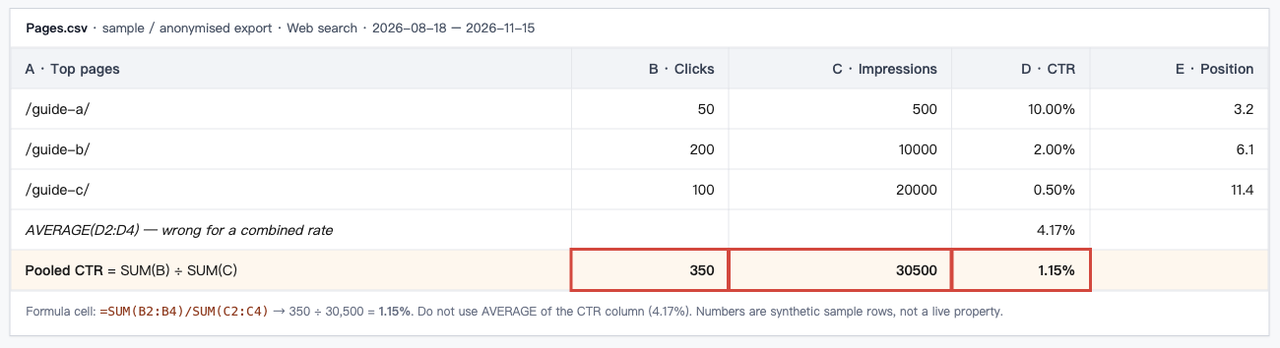
On a synthetic Search Console–shaped export (seed 20261123), averaging three page CTRs produced 4.17% while the pooled rate was 1.15%—a 3.02 percentage-point fiction. That gap is the reason this guide exists.
In this guide you’ll learn:
- What organic CTR is (and how it differs from ad or email CTR)
- The exact formula and a worked calculation
- Why a blended site CTR misleads even when the arithmetic is correct
- How to find Average CTR in Google Search Console and recalculate it
- How to fix the three common aggregation mistakes
- A worked example of pooled CTR vs mean-of-row CTRs on one export
For “is this CTR good?” and position-band opportunity sizing, use organic CTR by position—this page stays on calculation and aggregation.
What organic CTR is (and how it’s calculated)
Organic click-through rate (organic CTR) is the share of organic search impressions that produced a click to your site. In Search Console it is clicks ÷ impressions for the filters you set (Performance report).
| Piece | Meaning in organic search |
|---|---|
| Clicks | Times someone clicked a link from Google Search (or News/Discover, depending on report) to your site |
| Impressions | Times a link to your site appeared in results under Google’s counting rules |
| Organic CTR | clicks ÷ impressions (often shown × 100 as a percent) |
| Scope | Same search type, dates, and filters on both numbers |
Worked example
Suppose one unfiltered Web property view returns 350 clicks and 25,000 impressions:
- Organic CTR = 350 ÷ 25,000 = 0.014
- As a percent: 0.014 × 100 = 1.4%
- Search Console’s Average CTR for that view should match (before percent rounding)
If those three lines disagree, you mixed date ranges, search types, or averaged row percentages instead of pooling clicks and impressions. For quick arithmetic on an export, use the CTR calculator.
Organic CTR vs other “CTR” labels
Same formula shape, different denominators:
| Context | Numerator | Denominator |
|---|---|---|
| Google organic (GSC) | Organic clicks | Organic impressions |
| Search ads | Ad clicks | Ad impressions |
| Clicks (or unique clickers) | Delivered (or opened) messages | |
| On-site button | Clicks on the control | Views of the page (or of the element) |
Calling all of them “CTR” is fine. Comparing a 2% Search Console rate to a 10% email click-to-open rate is not.
Why it matters (and when a site-wide number doesn’t)
Organic CTR is useful as a snippet and SERP-competition signal once you hold position and query mix roughly steady. A single blended site CTR is a weak KPI on its own because rank, brand searches, and SERP features dominate the number.
Why calculate it carefully anyway:
- It is the official Search Console rate, so you can sanity-check exports and API math against the UI (Help).
- Wrong rollups invent performance that never happened—see the 4.17% vs 1.15% gap in the worked example below.
- CTR falling while average position holds often means the results page changed around you (ads, AI Overviews, sitelinks), not that your HTML title “broke overnight.”
When to de-prioritize a blended rate: a site whose traffic is mostly branded navigational queries; a new URL with a handful of impressions; any dashboard that averages daily or query CTRs without weighting by impressions.
Google’s own BigQuery samples compute CTR as sum(clicks) / sum(impressions)—never as an average of per-row rates (sample queries). If a guide tells you to “average the CTR column,” treat that as a bug.
Where to find organic CTR in Search Console (and how to recalculate it)
Does Google calculate organic CTR for you? Yes. The Performance report’s Average CTR is clicks ÷ impressions for the current filters (Help). You still need to know which grain you are looking at.
You need Search Console access to the property (owner or full user).
1. Read Average CTR on the property
- Open Search Console → Performance → Search results.
- Set Search type to Web (unless you intentionally want Image, Video, or News).
- Pick a complete multi-week date range; leave the newest preliminary days out of a baseline if you care about stable totals.
- Turn on Total clicks, Total impressions, Average CTR, and Average position.
- Read Average CTR above the chart—that is property-grain CTR for those filters.
(No Search Console UI screenshot here—follow the five steps above and match Average CTR to the totals in the next subsection.)
2. Recalculate from the same totals
- On the same Performance → Search results view, note Total clicks and Total impressions.
- Divide clicks by impressions (× 100 for a percent).
- Confirm the result matches Average CTR within ordinary percent rounding.
- If they disagree beyond rounding, check that search type and dates still match.
3. Calculate CTR for one page or query
- Still on Performance → Search results, open the Pages or Queries tab.
- Confirm columns Clicks, Impressions, CTR, and Position are visible.
- Pick one URL or query row and divide that row’s clicks by impressions—or click the row to filter the whole report and read Average CTR.
- For a set of rows (for example all non-brand queries), sum clicks and sum impressions first, then divide. Do not average the CTR column.
4. Export and calculate in a spreadsheet
- With your filters set, choose Export → Download CSV.
- Open
Pages.csvorQueries.csv. - Combined CTR =
SUM(clicks) / SUM(impressions). - Optional: compare to the CTR calculator for the same file when you move on to position-band checks.
What is a good organic CTR?
There is no universal good organic CTR. Rank, brand, intent, and SERP layout move the number more than title adjectives do.
For judging rates and sizing missed clicks by position band, use organic CTR by position and the CTR calculator. This page stops at getting the arithmetic right.
How to fix wrong calculations (and real CTR problems)
1. Stop averaging the CTR column
Do: SUM(clicks) / SUM(impressions) for any combined rate. Why: A 10% CTR on 500 impressions and a 0.5% CTR on 20,000 impressions are not equal votes. Verify: In the worked example below, mean of page CTRs is 4.17%; pooled CTR is 1.15%.
2. State the grain: property, page, or query
Do: Label every number with its aggregation. Why: Property chart ≠ sum of Pages ≠ sum of Queries (Help). Verify: Chart impressions vs SUM of page impressions on the same dates.
3. Split brand and non-brand before celebrating
Do: Filter or tag branded queries separately. Why: Brand rows can show navigational CTRs that drown discovery queries. Verify: In the worked example, brand CTR 15% vs non-brand 0.73% on the same export.
4. Check mix before rewriting the title
Do: Compare persistent queries separately when impressions rise and CTR falls. Why: More impressions on low-CTR queries pull the blend down even if every group’s CTR rises. Verify: Worked-example mix shift: groups improve, combined CTR 8.4% → 4.8%.
5. Hold position steady when diagnosing a drop
Do: Trend CTR inside a position band (or for queries whose position barely moved). Why: Rank changes swamp snippet effects. Verify: If position held and CTR fell, inspect the live SERP (ads, AI Overview, sitelinks).
6. Don’t invent organic CTR from GA4 alone
Do: Use Search Console for clicks and impressions; use GA4 for what happens after the click. Why: GA4 records sessions and users, not Search impressions. Verify: google/organic sessions will not equal GSC clicks one-for-one (Google on using both).
7. Change one snippet factor, then remeasure the same scope
Do: Log the title/description change and compare matched filters after recrawl. Why: Otherwise you cannot tell mix shift from copy change. Verify: Same page, same query set, complete date windows—then judge clicks and CTR together.
Worked example: three wrong averages on a synthetic export
Beginning. Property totals, three page rows, four visible queries plus an anonymized remainder, seven daily rows, and a two-group mix shift—so every wrong average below is re-computable by hand.
Property grain (correct for the chart): 350 clicks ÷ 25,000 impressions = 1.4%.
Mistake 1 — average of page CTRs
| Page | Clicks | Impressions | Row CTR |
|---|---|---|---|
| /guide-a/ | 50 | 500 | 10.0% |
| /guide-b/ | 200 | 10,000 | 2.0% |
| /guide-c/ | 100 | 20,000 | 0.5% |
| Pooled | 350 | 30,500 | 1.15% |
| Mean of row CTRs | — | — | 4.17% |
Outcome: The unweighted mean is 3.02 percentage points higher than the pooled rate. Spreadsheet “average of the CTR column” invents performance that never happened. Page impressions also exceed property impressions by 5,500 on this export—expected when page aggregation double-counts multi-URL appearances relative to the property chart (Help).
Mistake 2 — treat visible queries as the whole site
Visible query rows sum to 260 clicks / 20,000 impressions (pooled 1.3%). Add the anonymized remainder (90 / 5,000) and you recover the property 350 / 25,000. Brand alone is 15% CTR; non-brand visible queries are 0.73%.
Outcome: Reporting only the query table without that caveat understates coverage and overstates how “typical” brand rows are.
Mistake 3 — average daily CTRs, or ignore mix
Seven daily rows pool to the same 1.4% property rate; the mean of daily CTRs is 1.66% (about 0.26 pp high). Separately, a mix shift keeps total impressions at 10,000 while moving weight to the low-propensity group: combined CTR falls 8.4% → 4.8% even though both groups’ CTRs rise (10% → 12% and 2% → 3%). Combined clicks fall 840 → 480.
Outcome: That is an impression-mix story, not proof that titles got worse.
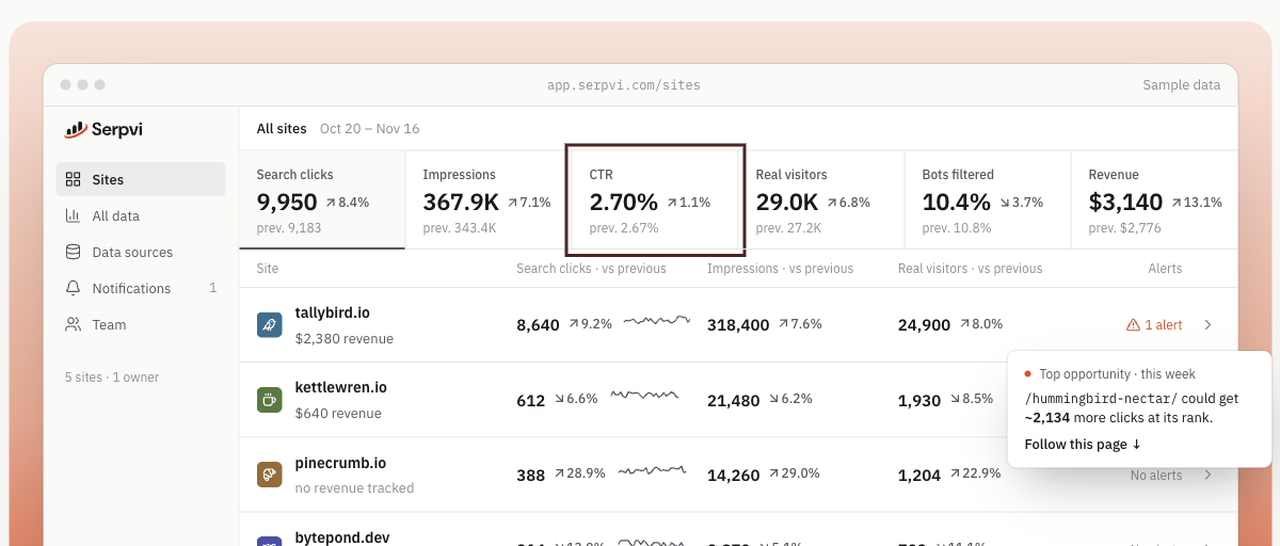
Once the rate is calculated correctly, the useful next question is which pages underperform your site at the same ranks—covered in organic CTR by position and the in-browser CTR calculator.
Final thoughts
Calculate organic CTR as clicks ÷ impressions on one declared scope. Trust Search Console’s Average CTR for that view, and rebuild any rollup with sums—not an average of percentages. When the blend moves, split brand, check position, and inspect mix before rewriting titles. Then hand the “is this good?” question to your own position-band baseline.
Frequently asked questions
How do I calculate my organic CTR?
Divide organic clicks by organic impressions for the same filters, then multiply by 100 for a percent. In Search Console, that is what Average CTR already shows for the current view (Help).
What is organic CTR?
Organic CTR is the click-through rate of unpaid search results: the share of times your listing was shown (impressions) that led to a click. It is not ad CTR, email CTR, or GA4 engagement rate.
How do I calculate organic CTR in Google Search Console?
Open Performance → Search results, set Web search and your dates, enable Average CTR, or divide Total clicks by Total impressions. For several pages or queries, sum clicks and impressions first.
Why doesn’t my query CTR match the site Average CTR?
Search Console hides anonymized queries in the Queries table, and table length is limited. Visible rows are a subset; property Average CTR uses the fuller property grain (Help).
Can I calculate organic CTR from GA4?
Not as clicks ÷ impressions. GA4 does not report Search impressions. You can study google/organic sessions after the click, but the CTR denominator lives in Search Console (or Bing Webmaster for Bing).
Should I average CTR across keywords?
No. Weight by impressions: total clicks ÷ total impressions. Averaging keyword CTRs gives tiny queries the same vote as head terms—the worked example shows a 4.17% fake average against a 1.15% pooled rate.
What is a good Google organic CTR?
Only relative to position, brand mix, and your own history. Prefer your site’s same-band median over a published curve—see organic CTR by position.
Does Bing organic CTR use the same formula?
Same clicks ÷ impressions shape; verify the exact metric definitions in Bing Webmaster Tools docs, and keep Google and Bing reports separate when you compare rates.