Google Search Console vs Google Analytics: How They Differ
By the serpvi team ·
In Google Search Console vs Google Analytics, the short answer is that they measure opposite sides of the click. Google Search Console reports how your site appears and earns clicks in Google Search. Google Analytics (GA4) reports what people do after arrival—from any channel. They sit on opposite sides of the click, use different metrics, and totals will not match. Treating them as one product is the usual mistake.
In this guide you’ll learn:
- What each tool is—and is not—including Tag Manager and Moz
- How clicks and sessions are defined, and why they diverge
- Why both matter for SEO and which is the source of truth
- Where to read clicks vs sessions in Search Console and GA4
- How to judge a normal gap vs a broken tag
- A diagnostic checklist and recomputable worked example
Google Search Console vs Google Analytics: what each tool measures
Google Search Console (GSC) is Google’s free search-performance and indexing product for verified properties. It answers: how often did we show in Google Search, which queries and pages, how often did people click, and can Google crawl/index the site? Data comes from Google Search itself—not from a tag on your pages (Search Central: using GSC and Analytics together).
Google Analytics 4 (GA4) is Google’s free (standard) measurement product for on-site and in-app behavior. It answers: where did sessions come from, which pages engaged, which key events fired? Data comes from the Google tag (or Tag Manager) running in the browser or app (same guide).
Google’s own comparable pair for organic search volume is:
| Tool | Metric | Definition (short) |
|---|---|---|
| Search Console | Clicks | Someone clicked a Google Search result link to your site |
| Google Analytics | Sessions | A period of on-site interaction attributed to a source/medium |
They are calculated differently on purpose. Trends should rhyme; totals should not be forced equal (discrepancy section).
How to compute the gap (one number):
`` sessions per click = google/organic sessions ÷ Web clicks ``
Example from our worked example below: 467 ÷ 800 = 0.5838. That ratio is a capture diagnostic—not a target of 1.0.
Features comparison (GSC vs GA4)
| Job | Search Console | Google Analytics (GA4) |
|---|---|---|
| Google queries that earned impressions/clicks | Yes | Only via GSC link / export—not native hit-level keywords for organic |
| Impressions, CTR, average position | Yes | No (unless linked Search Console reports) |
| Indexing, sitemaps, URL inspection | Yes | No |
| All traffic channels (paid, email, referral…) | No—Google Search (and related Search surfaces by report) | Yes |
| Engagement, funnels, key events / revenue | No | Yes |
| Needs site tag | No (property verification) | Yes |
| History in the product UI | About 16 months for Search Console performance (Analytics Help on linking) | Depends on property retention settings; not a search-query archive |
Cost: is either paid?
Standard Search Console and standard GA4 are free. Linking them is free. Google sells enterprise Analytics (Analytics 360) separately; that does not replace Search Console. Paid SEO suites (Moz Pro, Ahrefs, Semrush) charge for competitor data and longer storage—not for “unlocking” Google’s own clicks.
Google Analytics vs Google Tag Manager vs Search Console
| Tool | Role |
|---|---|
| Search Console | Search visibility and indexing data from Google |
| Google Analytics | Stores and reports measurement |
| Google Tag Manager | Deploys/changes tags (including the Google tag)—measures nothing by itself |
You can run GA4 without Tag Manager (tag in the page). You cannot replace Search Console with Tag Manager.
Google Search Console vs Moz analytics
Moz Pro estimates rankings, links, and competitor visibility from its own crawl and clickstream models. Search Console reports your verified property’s measured Google Search performance. Use GSC as the source of truth for your Google clicks and impressions; use Moz-class tools when you need competitor research Google does not give you for free.
Why the distinction matters
Search Console is the source of truth for Search performance. Analytics is the source of truth for on-site behavior (Search Central).
That split decides which dashboard you trust:
- Ranking, indexing, CTR, query mix → Search Console
- Organic session quality, engagement, key events, channel mix → GA4
- “Did SEO make money?” → start from GA4 key events on google/organic, then use GSC to see which queries and pages fed those landings
If you only watch GA4, you miss queries that impress but rarely click, indexing exclusions, and snippet problems. If you only watch GSC, you miss bounce-after-click quality, non-Google channels, and conversion paths. For position-band CTR opportunity math, see organic CTR by position; more measurement patterns live on /blog/.
Where to compare clicks and sessions (step by step)
Align Search type = Web in Search Console with session source = google and session medium = organic in GA4. Do not compare total GA sessions (all channels) to GSC clicks.
1. Read Web clicks in Search Console
- Open Search Console → Performance → Search results.
- Set Search type to Web.
- Choose a date range that ends at least a couple of days ago (see data delay below).
- Note Total clicks for the property (and optionally export Pages).
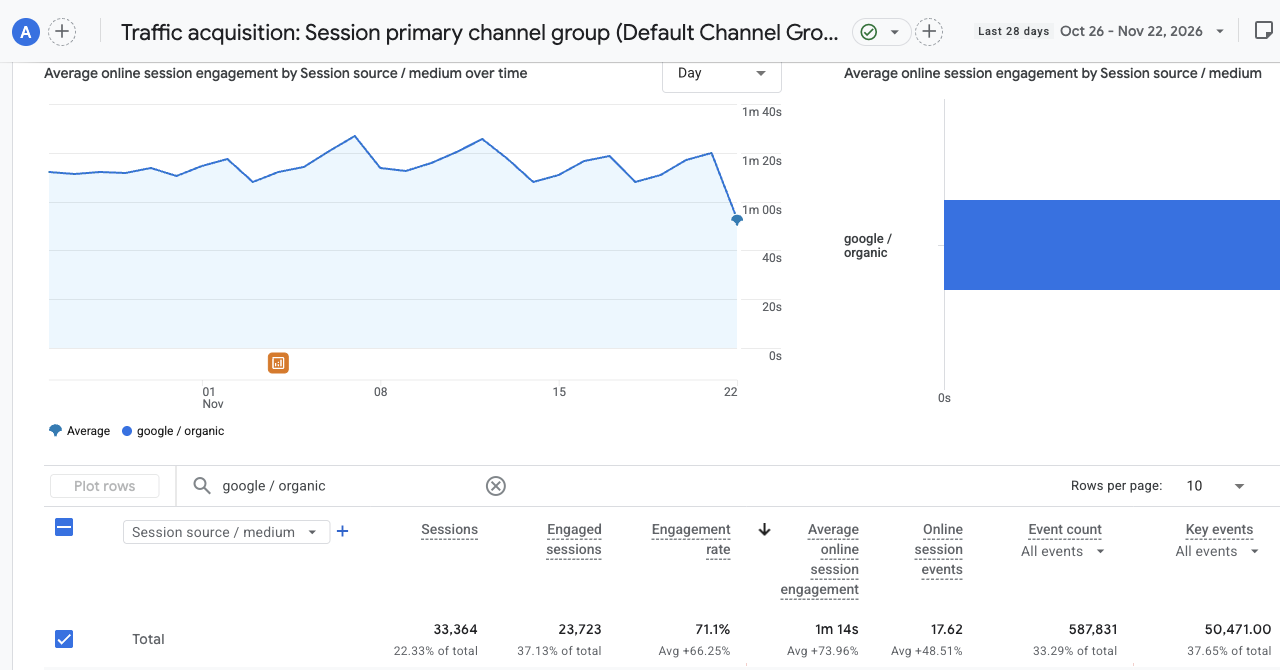
2. Read google / organic sessions in GA4
- Open the GA4 demo account or your property.
- Go to Reports → Acquisition → Traffic acquisition.
- Break down by Session source / medium (or filter Session source =
googleand Session medium =organic). - Read Sessions for
google / organicover the same absolute dates.
3. Link Search Console inside GA4 (optional, for query + landing views)
- In GA4 Admin → Product links → Search Console links → Link.
- You need Editor on the GA4 property and to be a verified owner of the Search Console property (Help).
- Pick the web data stream. Limits: one web stream ↔ one Search Console property (per Google’s linking rules).
- Publish the Search Console report collection from Library if it is still unpublished.
- Use Google organic search queries and Google organic search traffic for query/landing blends—not as a replacement for either product’s full UI.
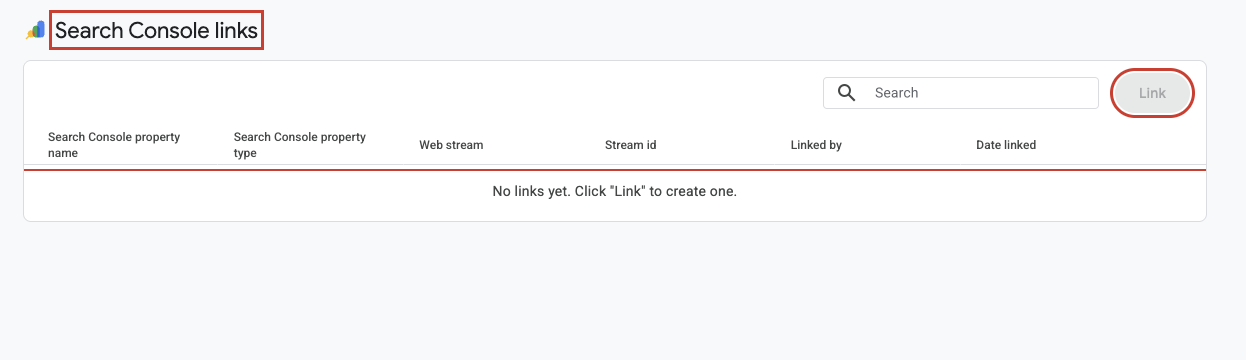
Linked Search Console metrics in Analytics are available about 48 hours after Search Console collects them, and inherit Search Console’s 16-month window (Help).
4. Optional: keep each source on its own clock
If you already centralize connectors, put Web clicks next to google/organic sessions and let each source keep its own latest complete day—GSC usually lags GA by 1–2 days. See /data-sources/ for how we handle that join.
Search Console data delay (and dataState all vs final)
Normal lag: Search Console Help states that collected performance data is normally available in 2–3 days, with Pacific Time day labels (About Search Console data). Day-level charts in GA4 use your property timezone—so daily lines disagree even when 28-day totals are close.
Fresher UI: The Performance 24 hours view can show hourly points only a few hours old; preliminary points use a dotted line and may change (Search Central blog, Dec 2024).
API dataState:
| Value | What you get | Use for |
|---|---|---|
final (or omit) | Finalized rows only | Anything you publish or trend long-term |
all | Includes fresh / still-processing data | Same-day monitoring; expect revisions |
hourly_all | Hourly breakdown; partial by design | Intended for use with the HOUR dimension |
When dataState=all and you group by date, the response may include metadata.first_incomplete_date; values on and after that date can still move (Search Analytics: query). Do not splice an all tail onto a final history—that creates a fake cliff.
How to judge the gap (when to worry)
Google’s guidance: small gaps are normal; investigate large gaps with their reason list—implementation, consent/cookies, timezone, attribution, canonical URLs, search-type breakdowns, non-HTML files, bots (Search Central).
Practical rules we use:
- Compare Web clicks to google / organic sessions, same absolute interval.
- Look at direction of trends first (both up / both down), not equality of totals.
- A stable sessions-per-click ratio with healthy tags is fine—even if it sits well below 1.0.
- Worry when the ratio collapses after a release, consent-banner change, or tag migration, while GSC clicks hold.
Reconciliation map (docs vs common myths)
| Claim you hear | Settled reading |
|---|---|
| “GA undercounts SEO” | Often true for tagged sessions vs Search clicks—different events, not a GA bug by default |
| “GSC and GA should match daily” | False: Pacific vs property timezone (Help) |
| “Use Organic Search channel = GSC” | Organic Search includes Bing etc.; filter google / organic for the comparable pair |
“dataState=all is fine for YoY charts” | Use final for published series (API) |
| “Linking GSC to GA4 removes the gap” | Linking adds reports; it does not make clicks equal sessions (Help) |
| “Canonical URLs explain every mismatch” | Google lists canonical URL differences as one discrepancy class; they can move a click to a different URL than the session landing page—check them when page-level rows diverge |
How to diagnose a bad gap (checklist)
Work these in order. Each step: what to do → why → how to verify.
1. Confirm you are on Web vs google/organic
Exclude Image/News/Discover clicks from the GSC side unless GA is measuring those landings the same way. Verify: Web-only export vs google / organic sessions.
2. Fix timezone apples-to-apples
Compare multi-week totals, or shift the GA calendar so both windows cover the same absolute time. Verify: 28-day totals move together even if single days do not.
3. Audit the Google tag coverage
Missing tags on templates, SPAs without history events, or PDF-only landing URLs show clicks without sessions. Verify: GA DebugView / Tag Assistant on top landing pages from GSC.
4. Check consent and blockers
Regions with strict consent will suppress GA more than GSC. Verify: ratio by country in both tools; a sharp EU-only gap is a clue.
5. Separate measurement loss from definition mismatch
Consent, missing tags, non-HTML, and bot filtering are measurement issues. Repeat clicks in one session and non-google attribution are definition issues. Only the first group is “fixable” toward parity.
6. Watch freshness when debugging “today”
Use the 24-hour view or dataState=all for incident response; switch back to final before you write the postmortem chart.
7. Keep query-level SEO in Search Console
GA4 will not become your keyword tool. For low CTR at a given position, use GSC queries/pages—and organic CTR by position for opportunity sizing.
Worked example: reconciling 800 Web clicks to 467 google/organic sessions
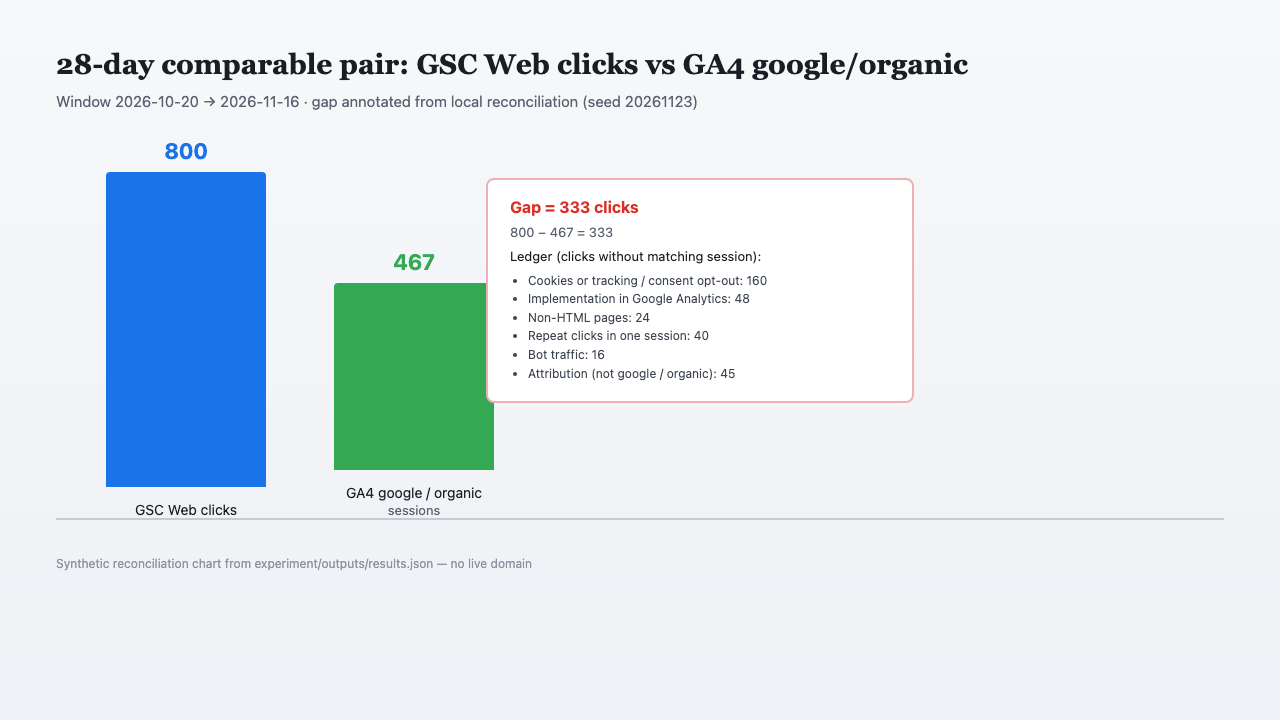
Beginning. A client-style question we hear constantly: “Search Console shows hundreds of clicks—why does GA show so few organic sessions?” To answer with numbers you can audit, we built a deterministic 28-day reconciliation (window 2026-10-20 → 2026-11-16) that encodes Google’s documented discrepancy classes as mutually exclusive outcomes. Every Web click either becomes a google/organic session or lands in exactly one ledger row.
Numbers.
| Metric | Value |
|---|---|
GSC Web clicks (final) | 800 |
GA4 google / organic sessions | 467 |
| Absolute gap | 333 |
| Sessions per Web click | 0.5838 |
Discrepancy ledger (sums to 333)
| Factor | Clicks without a matching google/organic session | Share of Web clicks | Maps to Google’s reason |
|---|---|---|---|
| Consent / blocker | 160 | 20.0% | Cookies or tracking |
| Tag missing / JS | 48 | 6.0% | Implementation |
| Non-HTML (e.g. PDF) | 24 | 3.0% | Non-HTML pages |
| Multiple clicks → one session | 40 | 5.0% | Different click vs session definitions |
| Bots filtered in GA | 16 | 2.0% | Bot traffic |
| Session not attributed google/organic | 45 | 5.6% | Attribution |
| Sum | 333 | 41.6% | → 800 − 333 = 467 |
Outcome. Split another way: 248 clicks (31%) were measurement loss; 85 (10.6%) were definition/attribution mismatch. Chasing “100% match” is the wrong goal—fix the 248, accept the 85 unless attribution rules are wrong for your business.
Extra traps in the same run
- Adding 60 Image clicks to the denominator drops the ratio from 0.5838 to 0.543—a self-inflicted comparison error.
- Pacific vs
Asia/Tokyoday labels reassigned 35 clicks across midnight; 28-day totals unchanged. dataState=allvsfinalon the tail: joining FINAL 2026-11-14 (27) after an ALL history ending 2026-11-13 (31) invents a −4 day drop that is a series-splice artifact, not a traffic crash.first_incomplete_datefor ALL is 2026-11-14.
Final thoughts
Use Search Console to earn and explain the Google click. Use Analytics to judge what that click did on the site. Compare Web clicks to google / organic sessions, trust trends over equality, and keep final data in anything you publish. When you want both sources—and Bing/Clarity—under one per-source clock, start from /how-it-works/.
Frequently asked questions
Is Google Search Console the same as Google Analytics?
No. Search Console is Google Search performance and indexing for verified sites. Analytics measures on-site (and app) behavior from a tag. They complement each other; neither replaces the other (Search Central).
Why are Google Search Console clicks different from Google Analytics sessions?
Clicks and sessions are different events. Consent, missing tags, timezones, attribution, non-HTML files, bots, and repeat clicks all create gaps. Google expects totals not to match and asks you to compare patterns (discrepancy guide).
What is the difference between Google Search Console and Google Analytics?
Search Console = before the click in Google Search (impressions, clicks, queries, indexing). Analytics = after the click on your site (sessions, engagement, key events). For SEO you usually need both.
Do I need Google Search Console or Google Analytics?
You need both for SEO. Search Console tells you what Google showed and who clicked; Analytics tells you what those visitors did next. Pick Search Console when the question is ranking, indexing, or CTR; pick Analytics when the question is engagement or conversions.
How long does Search Console data take to show up?
Often the newest one to three days look incomplete or empty in standard daily performance views because data is normally published on a 2–3 day cadence (Help). Use the 24 hours view for very recent (possibly preliminary) points.
What is Search Console dataState all vs final?
final (default if omitted) returns finalized data. all includes fresh data that may still change. hourly_all is intended for use with the HOUR dimension and returns partial hourly series (API reference). Use final for anything you publish.
How do I connect Google Search Console to GA4?
Admin → Search Console links → Link, as a GA4 Editor and Search Console verified owner; choose the web stream (Analytics Help). Linking adds query/landing reports; it does not make clicks equal sessions.
Is Google Search Console free? What about Analytics?
Yes for the standard products—both are free. Budget appears when you add Analytics 360 or third-party SEO/analytics suites. See /tools/ for free CTR helpers that sit beside these reports.