GA4 UTM Parameters Case Sensitivity: Why Reports Split
By the serpvi team ·
GA4 UTM parameters are case sensitive in their values: utm_source=google and utm_source=Google become two Session source rows (Google Analytics Help — URL builders). Most teams only check Session default channel group, where definitions are not case-sensitive (Default channel group)—so the channel total looks fine while campaigns quietly undercount.
In this guide you’ll learn:
- What UTM parameters are (and which ones GA4 actually reports)
- How case sensitivity works for values vs channel groups
- Where to find tagged traffic in GA4 (and how to spot a split)
- How to judge whether casing is bad enough to act on
- How to prevent and partially remediate mixed-case data
- A worked case: 2,805 sessions, 14 exact source/medium rows vs 6 after lowercase
What UTM parameters are (and how GA4 uses them)
UTM parameters are query-string tags you add to a destination URL so Analytics can attribute the visit to a campaign. Google’s URL builders page lists these parameters:
| Parameter | Typical use | Shows in GA4 properties? |
|---|---|---|
utm_source | Who sent the traffic (google, newsletter, linkedin) | Yes — Manual source / First user manual source / Session manual source (Traffic-source dimensions); Traffic acquisition also surfaces Session source (cross-channel) |
utm_medium | How it was sent (cpc, email, social) | Yes — matching manual / session medium dimensions |
utm_campaign | Campaign name | Yes — matching campaign name dimensions |
utm_id | Campaign ID (matches uploaded campaign data) | Yes — campaign ID dimensions |
utm_term | Paid keyword | Yes — manual term |
utm_content | Creative / link variant | Yes — manual ad content |
utm_source_platform | Buying or organic platform | Yes — manual source platform |
utm_creative_format | Creative type | Not currently reported in properties |
utm_marketing_tactic | Targeting tactic | Not currently reported in properties |
Always set at least utm_source, utm_medium, and utm_campaign. If Google Click IDs (GCLID/DCLID) cannot be used as intended and any UTM parameters are present, GA4 may derive cross-channel traffic-source dimensions exclusively from those UTMs—and missing ones show as (not set) (Traffic-source dimensions).
Example URL:
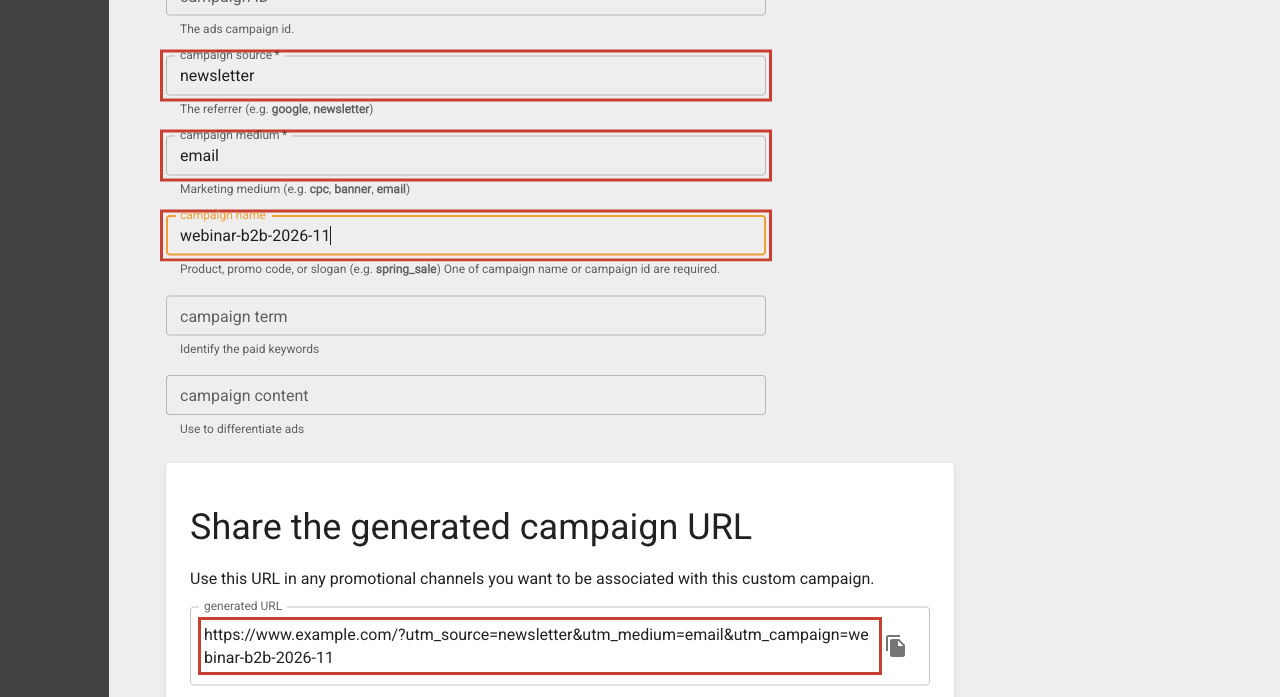
https://www.example.com/?utm_source=newsletter&utm_medium=email&utm_campaign=webinar-b2b-2026-11
Worked example (case split arithmetic)
Suppose one LinkedIn webinar actually drove 620 sessions, but links were tagged three ways:
| Session source / medium (exact) | Sessions |
|---|---|
| LinkedIn / paid_social | 310 |
| linkedin / paid_social | 190 |
| LINKEDIN / paid_social | 50 |
| LinkedIn / Paid_Social | 70 |
- True campaign total = 310 + 190 + 50 + 70 = 620
- Top-row share = 310 ÷ 620 = 0.50 (50%)
- If you read only the top row, you undercount by 310 sessions (50%)
Lowercasing every value collapses those four rows to one: linkedin / paid_social = 620. That is the same arithmetic the case section uses below.
Why case sensitivity matters (and when the channel report hides it)
Treat mixed case as a data-quality defect, not a branding preference. Brand names (LinkedIn, Meta) look polite in a spreadsheet and expensive in GA4.
Why it still matters when channels look fine:
- Session source, medium, and campaign stay fragmented—the tables marketers use for budget calls.
- Exact-match joins (cost imports, CRM exports, Looker filters typed as
linkedin) miss the Title Case row. - Month-over-month comparisons break if someone “cleaned up” capitals mid-flight.
- Synonyms (
fbvsfacebook) are a second problem: lowercase does not merge them. - Spaces, accents, and encoding create the same exact-string trap—
spring-salestays distinct fromSpring Sale, and accented tokens stay separate from ASCII twins (UTM Builder on capitals, accents, and spaces).
When it matters less: a one-off internal link that will never be compared; traffic you only ever read as Session default channel group and never by source/campaign. Even then, lowercase costs nothing.
Where to find UTM values in GA4 (and how to spot case splits)
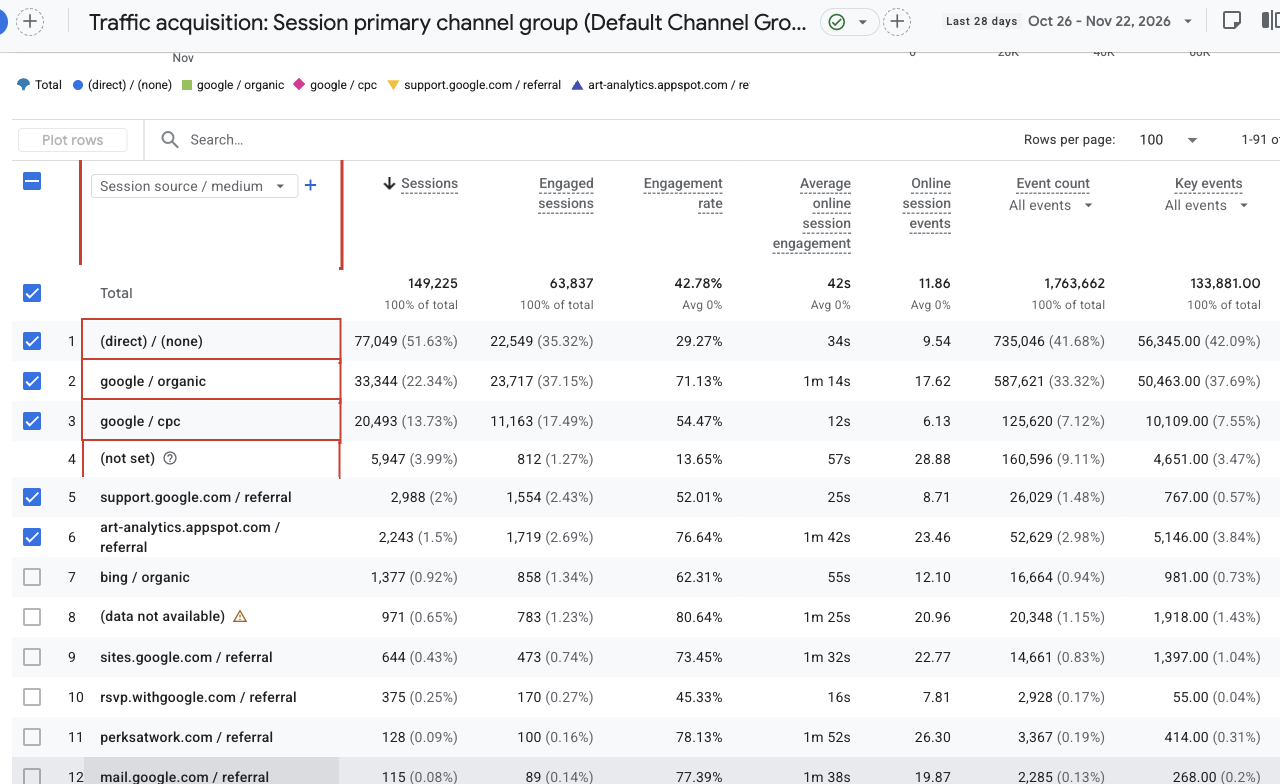
Google points you to Acquisition → Traffic acquisition for Session source/medium, Session medium, Session source, and Session campaign (URL builders).
Spot splits in Traffic acquisition
- Open Reports → Acquisition → Traffic acquisition.
- Set the primary dimension to Session source / medium (or Session source, Session campaign).
- Sort by Sessions descending.
- Scan for pairs that differ only by capitalisation (
LinkedIn / paid_socialnext tolinkedin / paid_social). - Optional: add Session default channel group as a secondary dimension—confirm both rows share one channel.
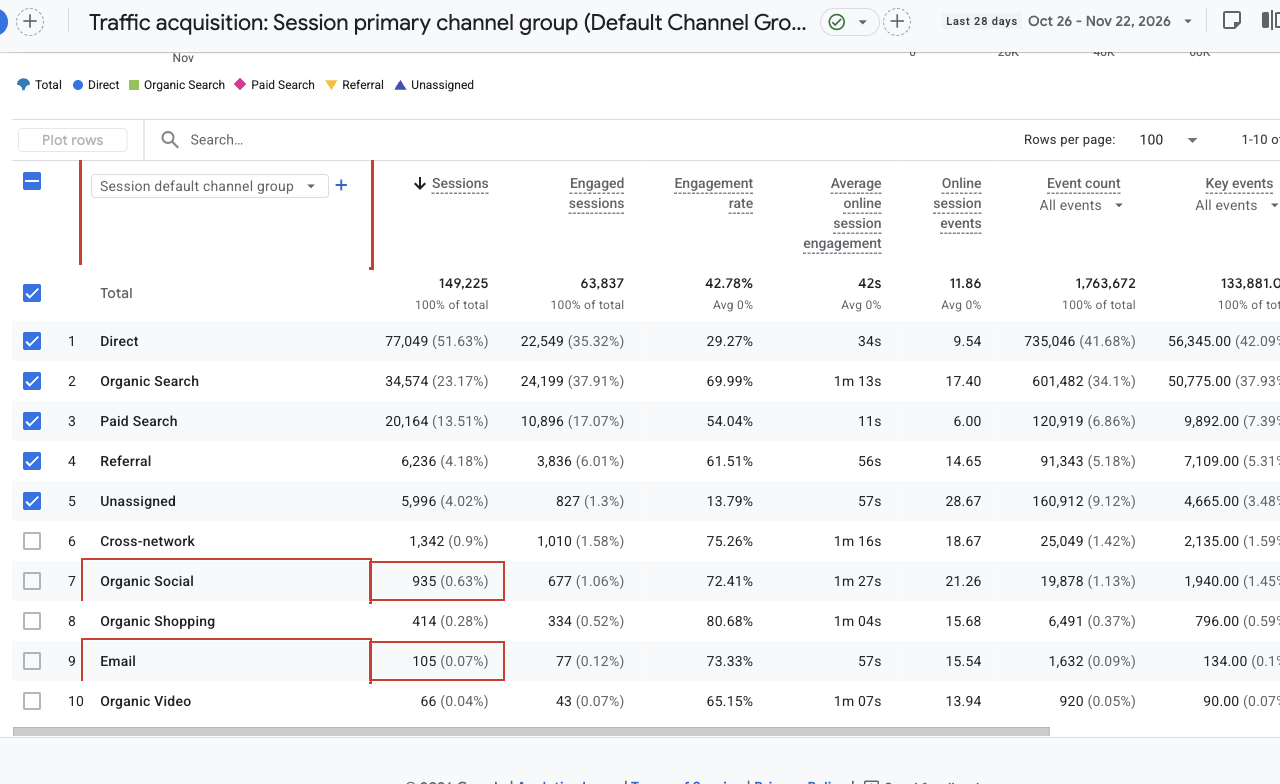
Confirm the channel total still looks healthy
- Same report → primary dimension Session default channel group.
- Note Email, Paid Social, Paid Search totals.
- Switch back to Session source / medium and add up the case twins by hand (or export).
Build a tagged URL (lowercase on purpose)
- Open the Campaign URL Builder.
- Enter website URL, campaign source, medium, and name (or ID).
- Type every value in lowercase with hyphens, not spaces (
webinar-b2b-2026-11). - Copy the generated URL; paste into the ad, email, or social post.
Verify in Realtime before you scale spend
- Open Reports → Realtime (or Admin → DebugView if you use debug mode).
- Click your new link in a private window.
- Confirm source, medium, and campaign match the exact lowercase strings you intended—for example
newsletter/email/webinar-b2b-2026-11, with no Title Case variants.
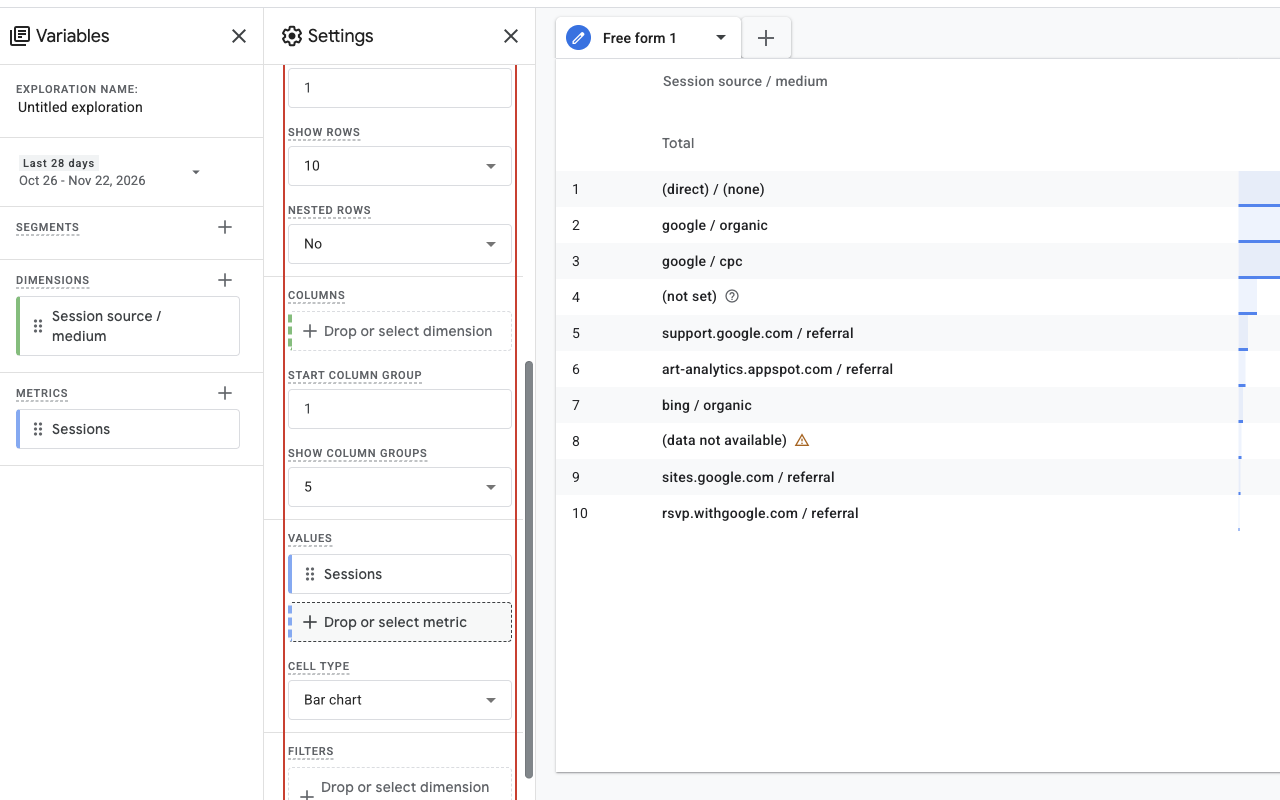
Exploration for stubborn splits
- Explore → Blank (Free form).
- Import Session source, Session medium, Session campaign, Sessions.
- Rows = Session source (or source/medium); Values = Sessions.
- Export if you need a lowercase merge in Sheets.
How to judge whether casing is “bad”
There is no universal “acceptable % Title Case.” Use these checks instead:
| Check | Act if… |
|---|---|
| Case twins on Session source / medium | Same platform appears twice with only capitalisation differing |
| Top-row share of a known campaign | Top row is far below the sum of twins (our LinkedIn family: top = 50%) |
| Channel vs source disagreement | Channel total is round; source table looks “thin” for that platform |
| Filter / cost join misses | Exact filter source = linkedin drops the LinkedIn row |
Where sources disagree
| Claim | Who says it | Who says otherwise | How to decide |
|---|---|---|---|
Parameter values are case-sensitive (google ≠ Google) | URL builders Help | — | Follow Google; use lowercase |
| Channel definitions are not case-sensitive | Default channel group; Custom channel groups | Some secondary posts claim uppercase medium → Unassigned | Prefer Google: Email and email can share the Email channel while remaining separate source/medium rows |
| Use lowercase as standard | URL builders best practices (Meta / meta example) | Brand-style guides that capitalise platform names in links | Analytics wins over brand casing in the query string |
| Data filters can rewrite past UTM case | Wishful dashboards | Data filters Help: filters apply going forward; they do not change historical data; types are internal / developer / hostname—not string rewrite | Do not use data filters to “lowercase” UTMs |
| Custom channel groups apply retroactively | Custom channel groups | — | Good for channel-level merge; standard properties: 2 custom groups |
How to prevent (and partially fix) mixed-case UTMs
The simplest prevention is to never type tags by hand: build every link in one place that checks casing, such as our free UTM builder, which flags any value with capitals before you copy the link.
Each item: what to do → why → how to verify.
1. Write a lowercase-only naming convention
Lock allowed utm_source and utm_medium values in a one-pager (linkedin, paid_social, email). Why: GA4 will not normalise for you. Verify: every new builder preset matches the list.
2. Build links from a tool, not from memory
Use the Campaign URL Builder or a shared sheet with data validation. Why: Title Case creeps in when people type brand names. Verify: spot-check five live ads for lowercase query values.
3. Prefer hyphens over spaces and underscores for campaigns
spring-sale beats Spring Sale and stays distinct from spring_sale. Why: lowercase alone does not merge separators. Verify: one campaign name string in the ad platform equals one utm_campaign value.
4. Check Realtime (or DebugView) before launch
One private-window click catches LinkedIn before it scales. Verify: Realtime dimension values match the convention character-for-character.
5. Do not expect GA4 data filters to clean history
Filters exclude internal/developer/hostname traffic going forward; they do not rewrite dimension strings (13296761). Verify: after any filter change, old case twins remain.
6. Merge at the channel layer with a custom channel group (limited)
Create rules that match all casings you already collected. Why: custom groups can apply retroactively (13051316). Verify: Traffic acquisition using that group shows one row for the family. Cap: 2 groups on a standard property.
7. Merge in Looker Studio / Sheets / BigQuery with LOWER()
Report-level lowercase fixes charts without changing GA4 storage. Verify: twin rows collapse; totals match the pre-merge sum.
8. Fix synonyms separately from case
fb and facebook stay two rows after LOWER(). Why: that is taxonomy, not casing. Verify: your convention picks one source token per platform.
More measurement walkthroughs: /blog/. Tooling index: /tools/.
Worked example: 2,805 sessions, 14 exact rows, one lowercase convention
Beginning. We needed numbers we could recompute for “what does mixed case do?” We built 18 tagged-session patterns totaling 2,805 sessions: email medium variants, LinkedIn/Meta paid social casings, Google/cpc source casing, Facebook vs fb, and spring-sale separator variants.
Method. Each row kept its exact utm_source / utm_medium / utm_campaign strings (GA4-style exact storage). We aggregated Session source/medium as exact keys, then again after lowercasing. Separately, a simplified case-insensitive channel matcher assigned Email, Organic Social, Paid Social, or Paid Search using Google’s published idea that channel definitions are not case-sensitive. We also modelled an exact-match cost join that only succeeds when the session source/medium string equals the lowercase spend key.
Headline results:
| Metric | Value |
|---|---|
| Sessions | 2,805 |
| Exact Session source/medium rows | 14 |
| Rows after lowercase merge | 6 |
| Rows collapsed by lowercase | 8 |
| Fragmentation ratio (exact ÷ lower) | 2.3333 |
| Synthetic equality demo (cost join): matched | 1,495 sessions |
| Synthetic equality demo (cost join): missed due to case | 910 sessions |
LinkedIn / paid_social family (620 sessions): 4 exact rows; top row 310 (50%); reading only the top row undercounts by 310. After lowercase: 1 row, 620 sessions.
Email channel vs medium casing: Session default channel group Email = 835 sessions. The webinar campaign alone still showed three medium strings—email (420), Email (180), EMAIL (40)—so the channel chart looked unified while Session medium stayed split.
Synthetic equality demo (cost join). An exact string match against lowercase spend keys attached cost to 1,495 sessions and missed 910 solely because of case mismatch (same lowercase key had budget; Title Case rows did not attach). This isolates equality failure; it is not a claim about every GA4 cost-import UI path.
Facebook synonym gap: after lowercase, facebook = 315 and fb = 85—still two rows. Case hygiene is necessary and not sufficient.
Outcome. Do not trend “LinkedIn” and “linkedin” as two channels. Do not trust channel-only views to certify tagging quality. Standardise lowercase at link creation; merge history in reports or custom channel groups when you must.
Final thoughts
GA4 will not forgive Title Case in the query string. Values are case-sensitive; channel groups are not—and that gap is exactly why the bug survives. Standardise on lowercase, verify in Realtime, and merge history in reports or custom channel groups when you must. When you need Search Console and GA4 side by side across sites—with GA4 source / medium pulled in daily—see how serpvi connects those sources.
Frequently asked questions
Are UTM parameters case sensitive in GA4?
Yes—values are. Google states that utm_source=google differs from utm_source=Google and recommends lowercase as standard practice (URL builders).
What are UTM parameters?
They are campaign tags in a URL (utm_source, utm_medium, utm_campaign, and related fields) that tell Google Analytics which marketing effort sent the visit. See the parameter table above.
Does capitalisation affect GA4 default channel groups?
Channel definitions are not case-sensitive (9756891). Email and email can land in the Email channel while still appearing as separate Session medium rows.
Does GA4 read UTM_SOURCE if the name is capitalised?
Google’s docs only show lowercase parameter names. Use utm_source, utm_medium, and utm_campaign exactly—don’t rely on other casings.
Can I fix mixed-case UTM data already in GA4?
Not inside stored hits. Data filters do not rewrite historical dimension values (13296761). Use custom channel groups (retroactive at the channel layer), or LOWER() in Looker Studio / BigQuery / Sheets for reports.
Where do I see Google UTM parameters in GA4?
Acquisition → Traffic acquisition, using Session source, Session medium, Session source/medium, and Session campaign. Explorations work the same dimensions.